Introduction
Having previously identified user needs and identified potential solutions in Part One, Part Two is focused on producing three prototypes related to the ideas identified in previous work.
I chose the the following three prototypes to explore:
- User Flow
- Storyboard
- Speculative design artefact
User Flow - Language Selection
User Pain Point: Language Accessibility Issues
Potential Solution: Ad-hoc Language Selector
Previous research uncovered that users depended on other people to help them understand AMS services. Users without assistance experienced problems using the service. Users who were not fluent in German also had to use third-party translation software, which didn’t always work due to technical issues with the eAMS site and service.
Potential Solution Concept
Multi-language website – allowing users to choose their preferred language ad hoc / when necessary.
Supporting Information
Languages Spoken in Austria
In Austria, these languages are most prominently spoken/understood: German, English, Serbo-Croatian, Turkish, Arabic.
Main Reason for AMS Sign-Up
The main reason people sign up for the AMS is to stay insured and receive financial aid.
Non-Austrian Citizens Using AMS
Non-Austrian citizens comprise a majority of AMS service users (55% in 2024), suggesting many service users may not have German as their first language.
eAMS Tool Usage
The eAMS tool is used for all communication between unemployed persons and advisors, as well as job hunting, registering for social benefits, social insurance, and government support, etc.
First Draft of Language Selector User Flow
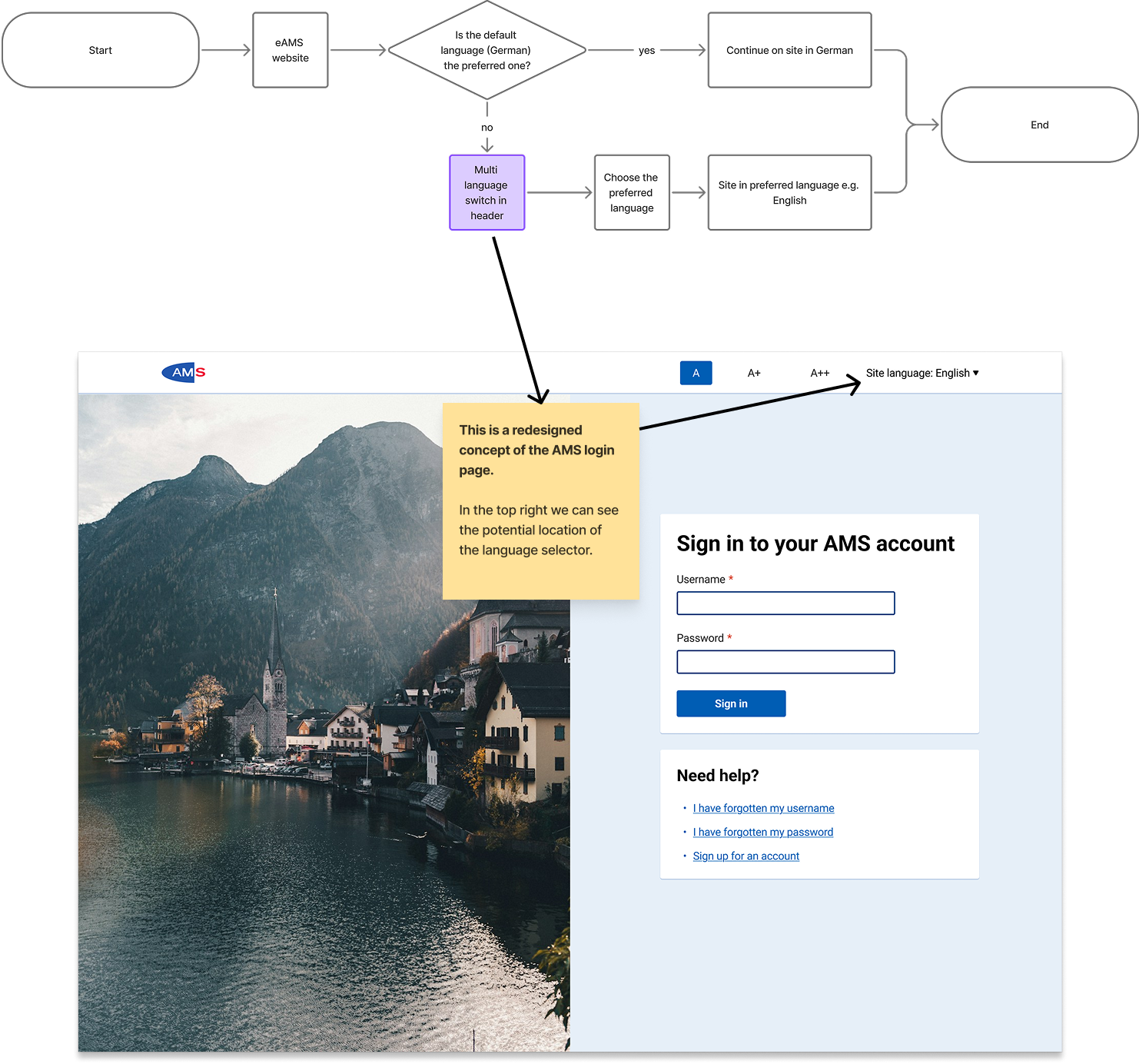
This user flow shows the process of arriving at the AMS website and choosing your preferred language. It assumes the design of the website would be changed to include a language selector in the header.
Language Selector using imagined Modal or Overlay component
This user flow shows the process of arriving at the AMS website and a trigger causing the user to be presented with a modal/overlay in which they must choose their preferred language.This flow could be used when the detected language of the user’s browser/system differs to the default language of the website.

User Flow - Language Selection at Signup
User Pain Point: Language Accessibility Issues
Potential Solution: Allowing users to choose their preferred language when signing up.
What if the user’s preferred language can be determined in the signup process? Meaning the user’s preferred language is set from the moment they register for the service.
Since AMS service users also receive a lot of information via post, setting their preferred language when registering may allow the AMS to then tailor the paper documents they send out to be in the recipients preferred language.
Potential Solution Concept
Multi-language website – allowing users to choose their preferred language ad hoc / when necessary.
Version 1 - Language selection happens during signup

Version 2 - Language selection happens before signup

User Flow - Language Selection: Combined Flows
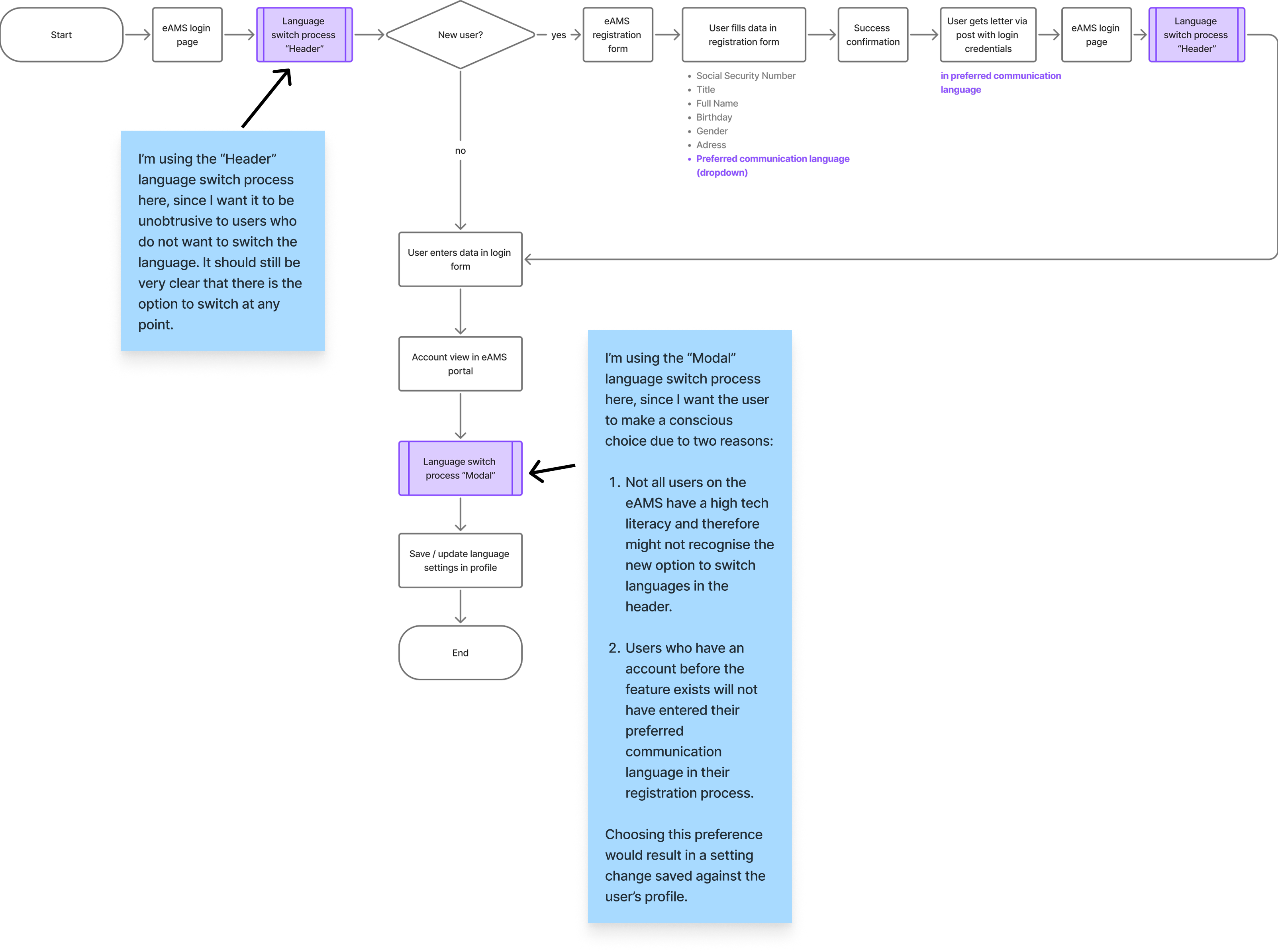
This flow combines concepts from the other flows, where changing the language is available via the site header and also available via a modal/overlay.
Storyboard
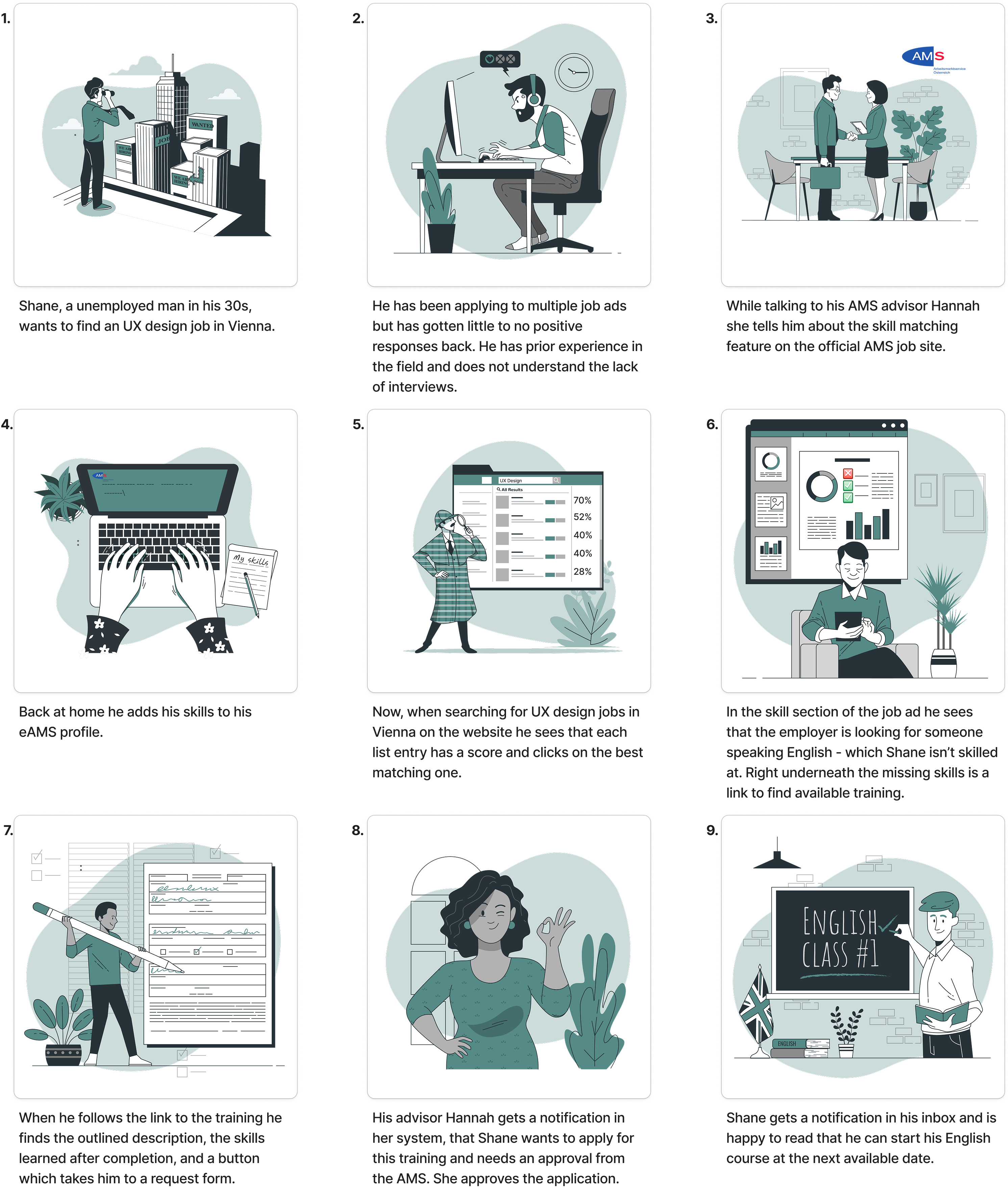
User Pain Point:Users found job searches unhelpful due to poorly tagged or unspecialized ads, forcing them to use other sites. Those seeking training struggled to find relevant courses on time and lacked clarity about the application process.
Potential Solution: Users can enter their skills and match their skill-score with the job ad. When missing specific skills users can find more information on training directly via the job ad. This is important as the AMS often pays for training if the service user can justify the need for it in order to get employment.
In the following storyboard I am focusing on a user who already has a specific job in mind, though I understand there may be a need to explore more scenarios
Scenario
- We want to prototype an online job site for jobseekers in Austria, that matches the existing skill set of the user with the skill set that is in the job ad, and allows the user to recognise possible missing skills with easy navigation to available training.
- We know our user group is jobseekers in Austria who are registered with the AMS.
- The issue is the current inadequate job search and difficulty in finding relevant courses for further training.
- The user’s motivation is they want to attend relevant training for a specific job/role since they are struggling to get interviews.
- The touchpoints we want to capture are the job site available to the jobseeker and the advisor.
Storyboard